



Introduction: The Price of “Free Wi-Fi”
[ Man-in-the-Middle attack detection ] We have all done it. You are at an airport or a coffee shop, you have 20 minutes to kill, and you see an open Wi-Fi network named Free_Airport_WiFi. You connect, check your email, and maybe log into your bank. In those 20 minutes, a hacker sitting three tables away could have intercepted everything you did.
This is called a Man-in-the-Middle (MitM) attack. It is one of the oldest and most effective techniques in the hacker’s playbook. Because you are on a public network, you are swimming in a shared pool, and it is trivial for a predator to pull you under.
This guide explains Man-in-the-Middle attack detection, how to spot the subtle warning signs of an Evil Twin attack, and how to ensure your public Wi-Fi security.
Anatomy of an Attack: How They Intercept You

In a normal connection, your laptop talks directly to the router, which talks to the internet.
Laptop <—> Router <—> Internet
In a MitM attack, the hacker inserts their device between you and the router.
Laptop <—> Hacker’s Laptop <—> Router <—> Internet
You still get internet access. The page still loads. But the hacker is essentially a “digital relay,” reading (and potentially modifying) every packet of data passing through them. This compromise of public Wi-Fi security is often invisible to the victim.
The “Evil Twin” Technique
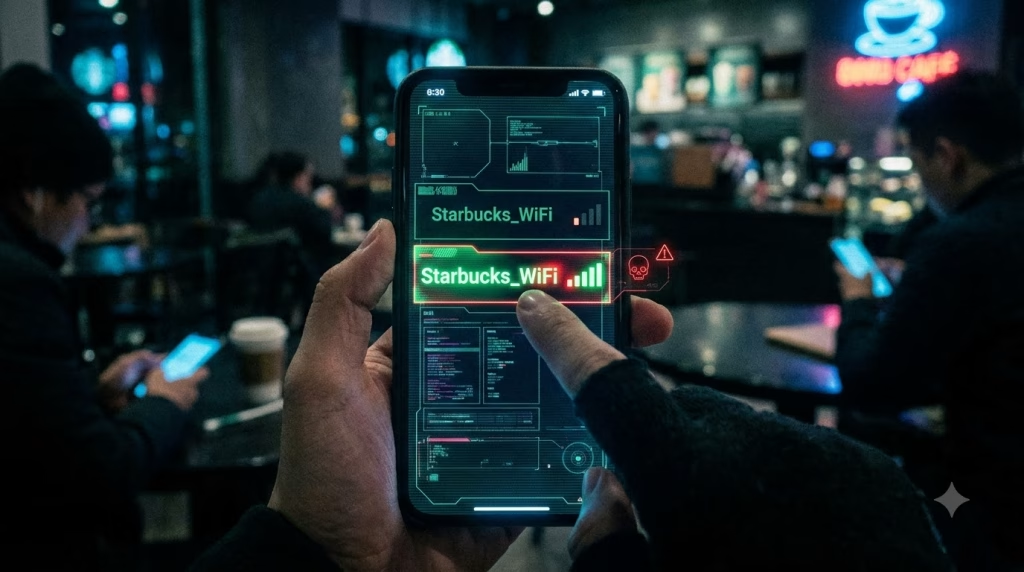
The most common method is the Evil Twin attack.
- The hacker sets up a Wi-Fi Pineapple (a hacking device).
- They broadcast a Wi-Fi network with the exact same name as the legitimate one (e.g., “Starbucks_WiFi”).
- Because their signal is stronger (they are sitting closer to you), your phone automatically connects to their device instead of the real router.
The Silent Killer: SSL Stripping
“But wait,” you ask. “Doesn’t HTTPS encrypt my traffic?”
Yes, but hackers have a workaround called SSL Stripping.
When you type bank.com, your browser initially tries to connect via HTTP. The bank’s server normally replies, “No, switch to HTTPS,” and your browser locks the connection.
In an attack, the hacker intercepts that request.
- Hacker to Bank: Connects via secure HTTPS.
- Hacker to You: Downgrades the connection to insecure HTTP.
You see the bank’s website. It looks real. But the “Lock” icon is missing. The hacker is reading your password in plain text, then encrypting it themselves and sending it to the bank. You are none the wiser—until the money is gone. This HTTPS downgrade is a hallmark of sophisticated interception.
Detection: The Warning Signs
Man-in-the-Middle attack detection is difficult because the attacks are designed to be seamless, but they often leave fingerprints. Try below interactive flash cards to make your mind understand basic Wi-Fi Security concepts.
Wi-Fi Security Concepts
SSL Stripping
Click to reveal ↻An attack where a secure https:// connection is downgraded to an unencrypted http:// connection, effectively removing the security padlock.
Significance of the NET::ERR_CERT_AUTHORITY_INVALID error
Click to reveal ↻
It acts as a ‘Stop Sign’ warning of a potential Man-in-the-Middle attack, indicating the browser does not trust the security certificate presented.
Mechanism of a VPN Tunnel against Wi-Fi snooping
Click to reveal ↻It acts as an ‘Armored Cable’, encasing the data stream in an encrypted pipe so that even if a hacker intercepts the traffic, they cannot read the contents.
The 4 rules of the ‘Coffee Shop Protocol’
Click to reveal ↻- 1. Turn off Auto-Join.
- 2. Forget old networks.
- 3. Check for the HTTPS Lock.
- 4. Keep your VPN ALWAYS ON.
1. The “Certificate Error” (The Big Red Flag)
If you try to visit google.com or your bank, and your browser screams “Your connection is not private” or “NET::ERR_CERT_AUTHORITY_INVALID”, STOP.
- What it means: The certificate presented by the website does not match the real Google. It usually matches the hacker’s interception software.
- The Mistake: Users often click “Advanced > Proceed Anyway” because they just want the Wi-Fi to work. Never do this. You are literally clicking “Yes” to being hacked.
2. The Missing Lock
Glance at the URL bar. Are you on http://amazon.com instead of https://amazon.com?
- In 2025, no major website uses HTTP for login. If the ‘S’ is missing, you are likely being stripped.
3. Unexpected Captive Portals
If you connected to the Wi-Fi 20 minutes ago, but suddenly a pop-up appears asking you to “Login again to continue using Wi-Fi,” be suspicious. Hackers often de-authenticate you to force you to reconnect to their Evil Twin, presenting a fake login page to steal your email/password.
4. Severe Lag
If the internet is unusually slow, it might be because all your traffic is being routed through a cheap hacking device that can’t handle the bandwidth.
Defense: How to Stay Safe
1. The VPN (Your Safety Net)
This is the #1 use case for a VPN.
If you connect to public Wi-Fi, turn on your VPN immediately. It creates an encrypted tunnel that the hacker cannot penetrate. Even if they intercept your traffic, all they see is encrypted gibberish. They cannot strip SSL because the VPN encryption wraps the entire connection. This is the ultimate tool for public Wi-Fi security.
2. Disable “Auto-Join”
Your phone is promiscuous. It loves to connect to networks it remembers.
- Settings: Go to Wi-Fi settings and turn off “Auto-Join” for public networks.
- Forget Networks: Periodically go through your “Saved Networks” list and “Forget” old airport/hotel networks. This prevents your phone from shouting “Is AT&T_Wi-Fi here?” to every hacker listening.
3. Use Your Hotspot
The safest public Wi-Fi is the one you own. Cellular data (5G/LTE) is significantly harder to intercept than Wi-Fi. If you are doing banking or sensitive work, disconnect from the coffee shop Wi-Fi and use your phone’s personal hotspot.
Conclusion: Trust No One
The convenience of “free connectivity” is a trap. Treat every public network as if it is hostile.
- Assume someone is listening.
- Assume the router is malicious.
- Armor up with a VPN or bring your own connection.
Status Check: You have now completed Pillar 2: Home Network Hardening.
- Hub: The Fortified Home Network
- Cluster 1: Router Security
- Cluster 2: VPN Truths
- Cluster 3: IoT Isolation
- Cluster 4: MitM Attacks (This file)